
Technical Fixes1 min read
SCP Connection closed error
SCP Connection closed error
SCP Connection closed error#
<u>Error 1:</u>

Fix:
- Find ~/.bashrc or /etc/bash.bashrc
- Remove any command that displays output, ie, echo, cat, etc
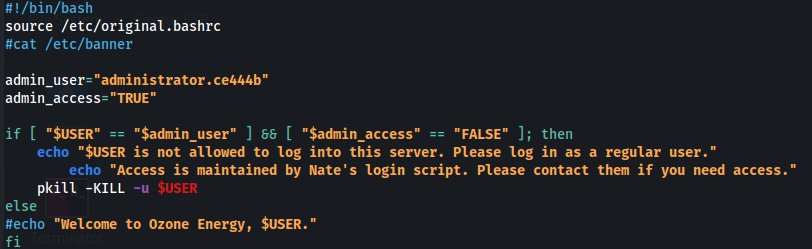
<u>Error 2:</u>

Fix:
- Add -O option into scp:
bash
scp -O -P 2200 n.reed@10.102.69.197:/tmp/sec.txt .Explained here:
TL:DR - Since OpenSSH 8.8 the scp utility uses the SFTP protocol by default. The -O option must be used to use the legacy SCP protocol.
And in this case, the target is using OpenSSH 8.2:

Related articles
Technical Fixes1 min
VMWare - Kali - Out of space
VMWare - Kali - Out of space
- linux
- vmware
- tryhackme
- hackthebox
- immersivelabs
Technical Fixes1 min
Docker error - Invalid interpolation format
Docker error - Invalid interpolation format
- linux
- docker
- tryhackme
- hackthebox
- immersivelabs
Technical Fixes1 min
Error - Exception: a bytes-like object is required
Error - Exception: a bytes-like object is required
- linux
- python
- tryhackme
- hackthebox
- immersivelabs